
One edit plan, no hand editing
The same moment, three times
You write what the ad should say. Lanibo Studio turns it into steps that drive the app, films them, and cuts the frame. Here is the Alexa moment of the video above.
The Alexa page: the line “Alexa, ask my Lanibo to add milk to the shopping list” rises. Voice: “Ask Alexa to add milk to the list.”
{ "do": "tap", "target": { "text": "Alexa" } },
{ "do": "mark", "name": "alexa" },
{ "do": "locate", "name": "alexaSay",
  "target": { "text": "add milk" } }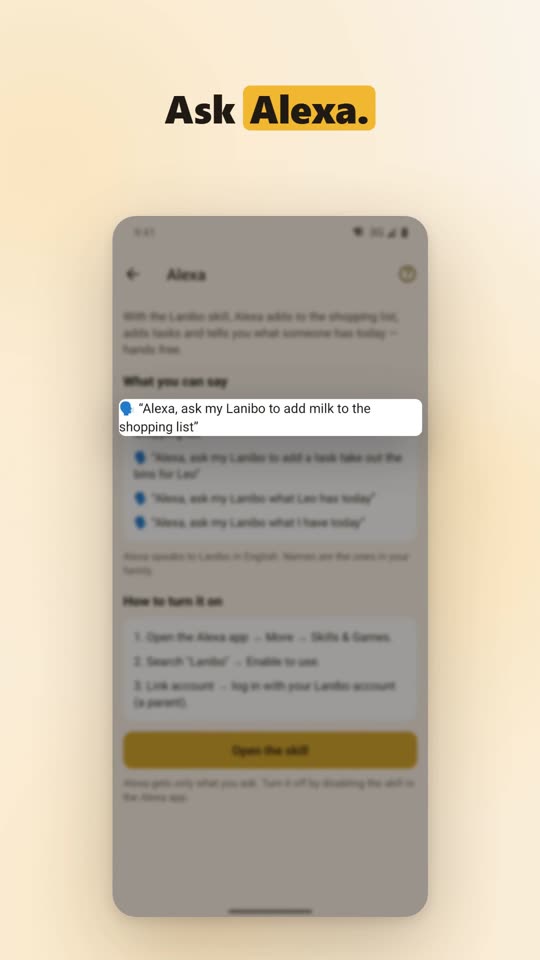
Made for the places apps are seen
The real app with no device frame, checked for length and for words Apple doesn't allow.
A floating screen, words that arrive with the voice, captions kept off the app's buttons.
A landscape cut of the same footage, from its own edit plan.
Like the video at the top of this page: muted, looping, with sound on a tap.
Why not the usual ways?
| Lanibo Studio | Screenshot animators | Screen recorders | AI ad generators | Agencies | |
|---|---|---|---|---|---|
| Shows the real, working app | Yes, filmed live | Still screens | Yes | Often generated scenes or avatars | Yes |
| After a redesign | Run the same steps again | Redo by hand | Record and edit again | Generate again | A new order |
| Who does the editing | The studio, from a plan you can read | You | You | The tool | Their team |
| Store rules | Checked on every video | Up to you | Up to you | Up to you | Their experience |
| Music and voice | Composed or licensed, narrated | Stock tracks | Add your own | Included | Included |
Good to know
Is it really the app, or a mock-up?
The real app, running on a phone or emulator, filmed as it is used. App Store previews must show the real app, and viewers can tell the difference.
What happens when the app's design changes?
The steps find buttons by their role, name or test id, not by their place on screen, so most changes need only a new recording: one command. The edit plan stays.
Which phones does it film?
Android today, automatically. iPhone recordings made by hand can be imported and edited the same way; automatic iPhone filming needs a Mac and is planned.
Where do the music and the voice come from?
Music is composed by the studio for each video, or a licensed song is cut to fit. The voice is read from the captions by a free, offline voice model, or your own recording is used.
How long are the videos?
As long as the place needs: 15 to 30 seconds for an App Store preview, longer for a tour like the one above (37 seconds).
Can I get a video for my app?
Not yet. Lanibo Studio is making Lanibo's own videos first. Write to us if you'd like to hear more.
Coming soon
Questions, or an app you'd like to see in a video? Write to support@lanibo.com.